Subscription-Based Licensing Model
PaperStream Capture Pro and Pro Premium are available via annual subscription‑based licences ranging from one to five years.
High up‑front investment costs are eliminated, making the value they deliver far more accessible.
Automatic application updates ensure you always have the latest version.
Both versions support all features of PaperStream Capture, but they are designed for different market needs.
PaperStream Capture Pro is ideal for corporate and SMB environments and works with A4 and smaller scanners. The Ricoh fi‑7460 and fi‑7480 are also supported.
PaperStream Capture Pro Premium is designed for professional scanning environments where production scanners may be used. It supports all scanners with a TWAIN interface, including A3 and larger devices, and includes the ability to import files from your archive.
Connectors and API
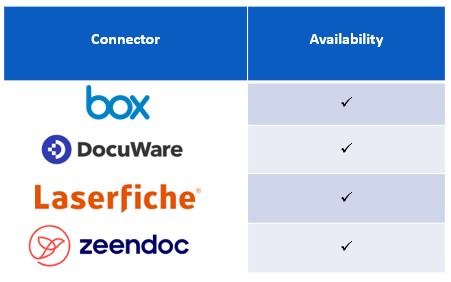
All versions of PaperStream Capture Pro support scanning directly to OneDrive, Dropbox and Google Drive, as with PaperStream Capture.
PaperStream Capture Pro and PaperStream Capture Pro Premium additionally support Box, DocuWare, Laserfiche and Zeendoc, with more connectors in development.
The release API available for both products also enables development of additional connectors, supported through resources provided by our Imaging Alliance Program.
Multi-Station Workflow
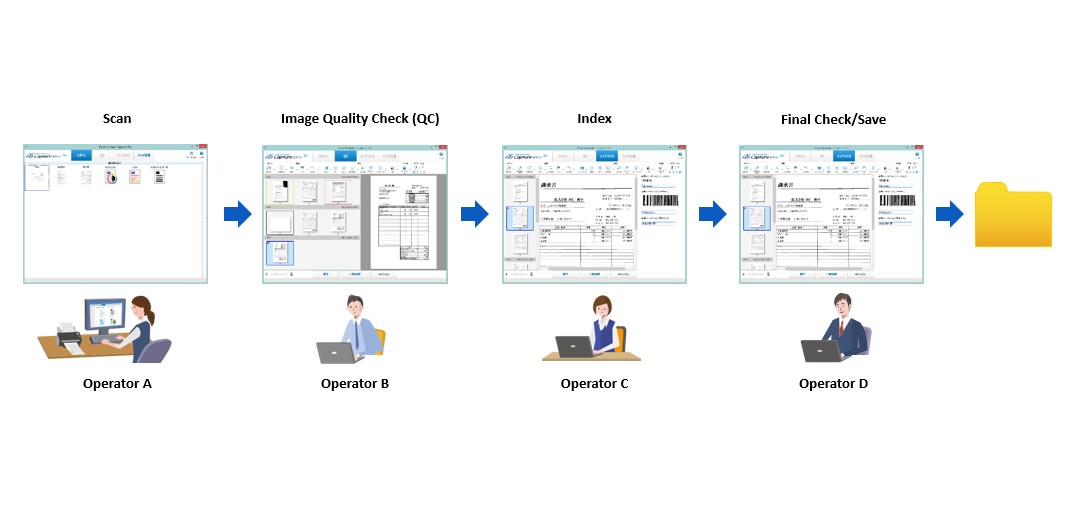
PaperStream Capture provides a single Scan, QC & Index Station, whereas PaperStream Capture Pro and Pro Premium allow additional PC Scan Stations to separate subsequent QC and Indexing processes.
Each stage of the workflow can be handled by a different operator, enabling workloads to be balanced across stations.
Having separate QC and Index stations provides greater flexibility, agility and scalability across the information‑capture process.
Data such as scan start and finish times, and QC and Indexing durations for each batch, can be output as log files and used to optimise the process.
Dedicated licences for non‑scanning QC or Index stations are available at a reduced price, lowering overall costs.
File Import
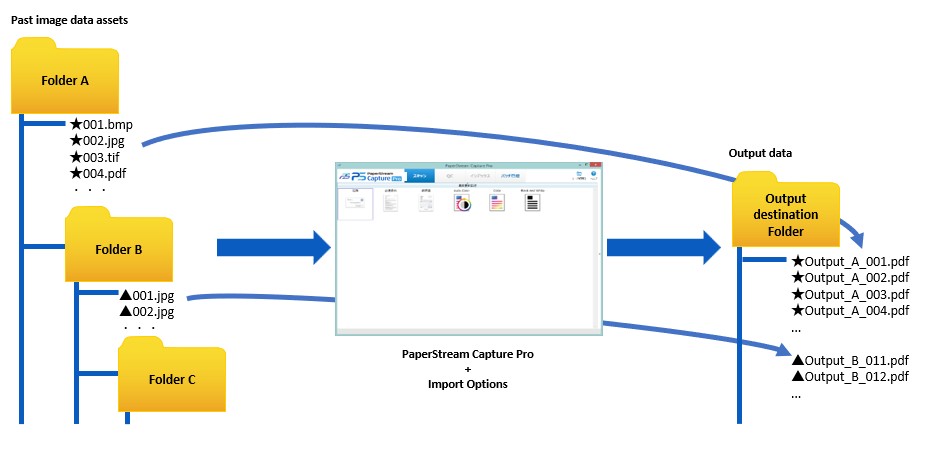
PaperStream Capture Pro Premium offers the option to import files from an archive.
Disparate formats stored in various locations can be processed and saved in a common file format, with logical filenames, in an appropriate destination.

High-Productivity Intelligent Form Capture
For the first time, a mainstream capture application offers the ability to recognise a form by its layout and capture the data entered as text - whether printed or handwritten non‑cursive.
PaperStream Capture Pro and Pro Premium’s new OCR‑based approach to form capture currently supports handwritten non‑cursive text in English, French, German, Italian, Spanish and Japanese.
This is ideal for any organisation that uses forms, from SMEs capturing customer feedback to bureaus processing thousands of documents.
Data Extraction by Form OCR
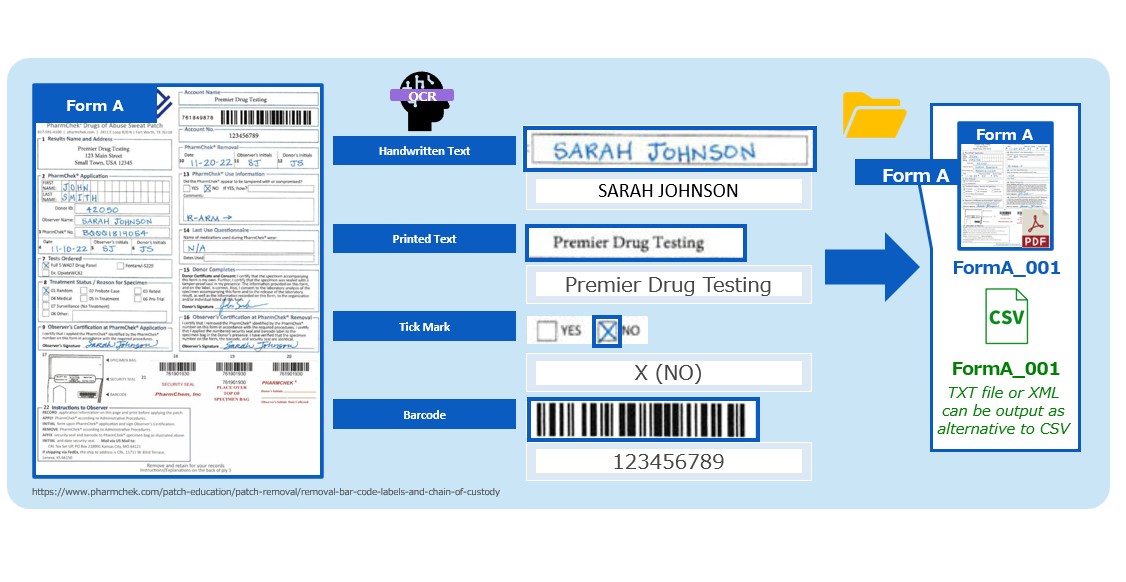
Data extraction by form OCR requires registering the blank form and marking the fields to be captured.
Up to 100 fields can be captured per form, and up to 20 forms can be registered for any job.
The software identifies the form type within a mixed batch and automatically extracts the relevant data - including handwritten non‑cursive text, printed text, tick boxes and barcodes.
Data is typically output as a CSV file, but TXT and XML formats are also supported depending on configuration.
This data can then be used like other PaperStream metadata — for example, to name files.
Redaction
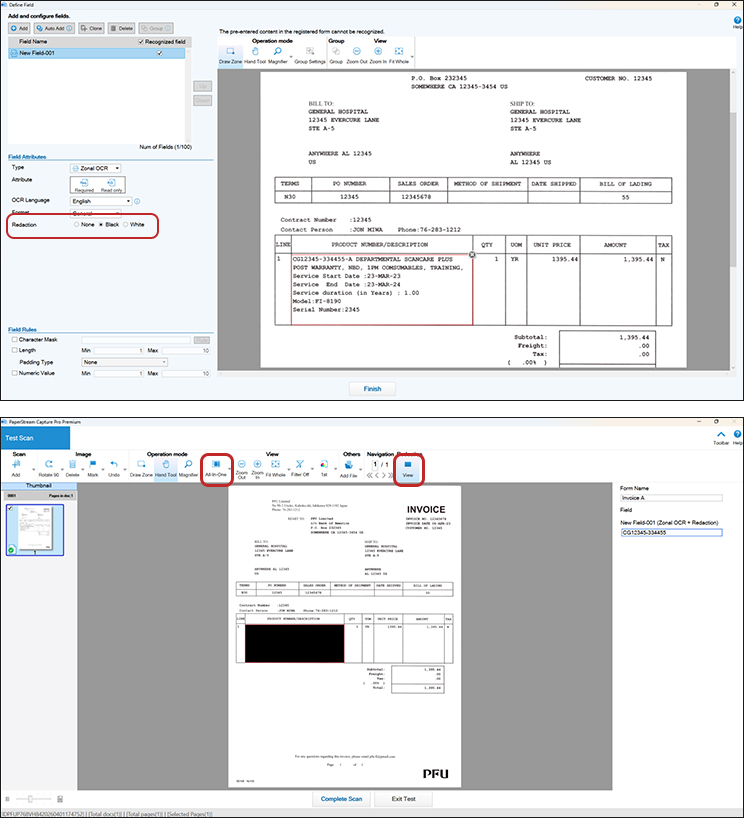
In addition to data capture, the form setup feature allows areas of a form to be marked for redaction from the image file.
This is ideal for removing personal data in territories with GDPR or similar privacy regulations.
A post‑redaction option is also available in versions from 5.2 onwards. This allows an operator to mark an area for redaction after scanning, during QC — ideal when customers place confidential data in the wrong location on the form.
Form Separation
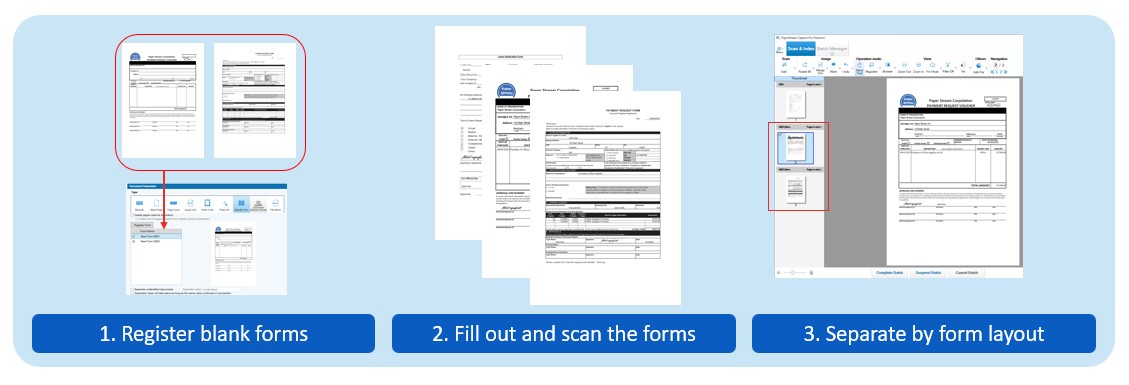
Form layout becomes a new separation method, enabling different form types within a batch to be output to different locations.